<?xml version="1.0" encoding="utf-8"?>
<feed xmlns="http://www.w3.org/2005/Atom">
    <id>https://tristanlabelle.com/blog</id>
    <title>La vie est Labelle</title>
    <updated>2026-08-31T01:42:42.932Z</updated>
    <generator>https://github.com/jpmonette/feed</generator>
    <author>
        <name>Tristan Labelle</name>
        <uri>https://tristanlabelle.com/about</uri>
    </author>
    <link rel="alternate" href="https://tristanlabelle.com/blog"/>
    <subtitle>Tristan's thoughts on languages, software, music, and life.</subtitle>
    <icon>https://tristanlabelle.com/favicon.ico</icon>
    <rights>All rights reserved 2026, Tristan Labelle</rights>
    <entry>
        <title type="html"><![CDATA[Three Designs for Decoding File Formats]]></title>
        <id>https://tristanlabelle.com/blog/decoding-file-formats</id>
        <link href="https://tristanlabelle.com/blog/decoding-file-formats"/>
        <updated>2022-01-11T00:00:00.000Z</updated>
        <content type="html"><![CDATA[<h1>Three Designs for Decoding File Formats</h1>
<p>This article presents three object-oriented designs for decoding file formats, in the spirit of the Gang of Four design patterns. Structuring your decoding logic by following one of these designs will increase the maintainability and reusability of your code, turning it into a richer API with minimal additional work.</p>
<p>Most useful programs need to process data from files or network streams. This involves two logical steps: decoding the bytes or characters of the stream according to the file format to extract useful data types, and processing the resulting data according to its purpose for the program. In a simple implementation, those two steps are intertwined, as illustrated by this code for parsing properties in the <a href="https://en.wikipedia.org/wiki/INI_file">INI file format</a>, which represents simple key/value pairs organized in named sections:</p>
<pre><code class="language-cs"><span class="hljs-comment">// Decoding the ini file format</span>
<span class="hljs-built_in">string</span> line = stringReader.ReadLine();
<span class="hljs-keyword">var</span> match = Regex.Match(line, <span class="hljs-string">&quot;^(\w+)\s*=\s*(\w+)\s*$&quot;</span>); <span class="hljs-comment">// name=value</span>
<span class="hljs-comment">// Processing the data as needed by the program</span>
<span class="hljs-keyword">if</span> (match.Success &amp;&amp; section == <span class="hljs-string">&quot;settings&quot;</span> &amp;&amp; match.Groups[<span class="hljs-number">1</span>].Value == <span class="hljs-string">&quot;history_length&quot;</span>)
  history.Resize(<span class="hljs-built_in">int</span>.Parse(match.Groups[<span class="hljs-number">2</span>].Value));
</code></pre>
<p>This coupling introduces a few issues:</p>
<ol>
<li>The implementation can become very complex when both decoding and data processing are nontrivial.</li>
<li>The decoding logic cannot be reused to process the data in a different way.</li>
<li>The decoding and data processing logic cannot be tested in isolation.</li>
</ol>
<p>To address these issues, these two pieces of logic need to be decoupled. This article presents three designs which achieve this, in the spirit of the Gang of Four design patterns. The basic idea behind each design is simple and commonly found in libraries, but there are various interesting ways to extend and combine them.</p>
<p>The INI file format will be used as an example for its simplicity, but the concepts apply to more complex formats as well. Generalizing, this article will use the terminology &quot;node type&quot; to refer data types defined in a file format, whether hierarchical or not. For example, the INI file format can be described using two node types: sections (e.g. <code class="code-span">[my_section]</code>) and properties (e.g. <code class="code-span">my_property=my_value</code>).</p>
<h2>Reader design</h2>
<p>With the <strong>Reader</strong> design, every node type becomes a getter on a <code class="code-span">Reader</code> class. A <code class="code-span">Read()</code> method and a <code class="code-span">State</code> property allows the consumer to iterate through the nodes of the file and know which data to retrieve. This is akin to an <code class="code-span">IEnumerator&lt;T&gt;</code> where <code class="code-span">T</code> would be a discriminated union of node types. A good example is <a href="https://docs.microsoft.com/en-us/dotnet/api/system.xml.xmlreader"><code class="code-span">System.Xml.XmlReader</code></a> in the .NET base class libraries (<code class="code-span">XmlReader.NodeType</code> is equivalent to the State property above). <a href="https://www.newtonsoft.com/json/help/html/t_newtonsoft_json_jsonreader.htm"><code class="code-span">Newtonsoft.Json.JsonReader</code></a> is similar.</p>
<pre><code class="language-cs"><span class="hljs-keyword">class</span> <span class="hljs-title">Reader</span>
{
  State State { <span class="hljs-keyword">get</span>; }
  <span class="hljs-function"><span class="hljs-built_in">bool</span> <span class="hljs-title">Read</span>()</span>;
  <span class="hljs-function"><span class="hljs-built_in">string</span> <span class="hljs-title">GetSectionName</span>()</span>;
  <span class="hljs-function"><span class="hljs-built_in">string</span> <span class="hljs-title">GetPropertyName</span>()</span>;
  <span class="hljs-function"><span class="hljs-built_in">string</span> <span class="hljs-title">GetPropertyValue</span>()</span>;
}

<span class="hljs-built_in">enum</span> State { Initial, Section, Property, End }
</code></pre>
<p>Data processing logic typically takes the form of a while loop with a nested switch statement to handle the different states. Each consumer will likely have to repeat some amount of this boilerplate.</p>
<pre><code class="language-cs"><span class="hljs-keyword">while</span> (reader.Read())
{
  <span class="hljs-keyword">switch</span> (reader.State)
  {
    <span class="hljs-keyword">case</span> State.Section: Console.WriteLine(<span class="hljs-string">&quot;New section: &quot;</span> + reader.GetSectionName()); <span class="hljs-keyword">break</span>;
    <span class="hljs-keyword">case</span> State.Property: Console.WriteLine(<span class="hljs-string">&quot;New property: {0} = {1}&quot;</span>, reader.GetPropertyName(), reader.GetPropertyValue()); <span class="hljs-keyword">break</span>;
  }
}
</code></pre>
<h3>Improvements</h3>
<p>A <strong>Reader</strong> can also expose methods to skip parts of the file of no interest, or even seek to arbitrary locations if the file format supports random access.</p>
<pre><code class="language-cs"><span class="hljs-function"><span class="hljs-built_in">bool</span> <span class="hljs-title">SkipSection</span>()</span>;
</code></pre>
<h2>Sink design</h2>
<p>With the <strong>Sink</strong> design, every node type in the file becomes a void-returning method on an interface, and a method is provided that takes a stream, decodes the data and &quot;feeds&quot; every node into a sink implementation. A good example is <a href="https://docs.microsoft.com/en-us/windows/win32/api/d2d1/nn-d2d1-id2d1simplifiedgeometrysink"><code class="code-span">ID2D1SimplifiedGeometrySink</code></a>.</p>
<pre><code class="language-cs"><span class="hljs-keyword">interface</span> <span class="hljs-title">ISink</span>
{
  <span class="hljs-function"><span class="hljs-keyword">void</span> <span class="hljs-title">BeginSection</span>(<span class="hljs-params"><span class="hljs-built_in">string</span> name</span>)</span>;
  <span class="hljs-function"><span class="hljs-keyword">void</span> <span class="hljs-title">AddProperty</span>(<span class="hljs-params"><span class="hljs-built_in">string</span> name, <span class="hljs-built_in">string</span> <span class="hljs-keyword">value</span></span>)</span>;
  <span class="hljs-function"><span class="hljs-keyword">void</span> <span class="hljs-title">End</span>()</span>; <span class="hljs-comment">// Optional</span>
}

<span class="hljs-function"><span class="hljs-keyword">static</span> <span class="hljs-keyword">void</span> <span class="hljs-title">ReadToSink</span>(<span class="hljs-params">Stream stream, ISink sink</span>)</span> {}
</code></pre>
<p>Data processing logic is achieved by creating a class implementing the interface and passing an instance of it to the <code class="code-span">ReadToSink</code> method. Of note is that <code class="code-span">ReadToSink</code> will then own the control flow, which prevents scenarios such as reading two streams at once and comparing them nodewise. Each sink implementer will also be required to do some amount of state tracking, for example to associate <code class="code-span">AddProperty</code> calls with the preceding <code class="code-span">BeginSection</code> call.</p>
<h3>Improvements</h3>
<p>If only parts of the file are of interest, the Sink design can be augmented to skip sections by returning a corresponding flag. For example:</p>
<pre><code class="language-cs"><span class="hljs-function"><span class="hljs-built_in">bool</span> <span class="hljs-title">BeginSection</span>(<span class="hljs-params"><span class="hljs-built_in">string</span> name</span>) <span class="hljs-comment">// Return false to skip (AddProperty will not be called)</span>
</span></code></pre>
<p>For file formats with a more hierarchical structure, multiple specialized sinks can be defined. Some sink methods then become factories for children sinks. This keeps the size of each sink interface smaller and can help implementers structure their code following the hierarchical structure of the data.</p>
<pre><code class="language-cs"><span class="hljs-keyword">interface</span> <span class="hljs-title">ISink</span>
{
  ISectionSink? BeginSection(<span class="hljs-built_in">string</span> name); <span class="hljs-comment">// Return null to skip</span>
  <span class="hljs-function"><span class="hljs-keyword">void</span> <span class="hljs-title">End</span>()</span>;
}

<span class="hljs-keyword">interface</span> <span class="hljs-title">ISectionSink</span>
{
  <span class="hljs-function"><span class="hljs-keyword">void</span> <span class="hljs-title">AddProperty</span>(<span class="hljs-params"><span class="hljs-built_in">string</span> name, <span class="hljs-built_in">string</span> <span class="hljs-keyword">value</span></span>)</span>;
  <span class="hljs-function"><span class="hljs-keyword">void</span> <span class="hljs-title">End</span>()</span>;
}
</code></pre>
<h3>Concrete Sink examples</h3>
<p>The Sink abstraction proves to be useful in many ways. Examples of common implementations include:</p>
<ul>
<li><strong>Writer</strong>: A writer sink encodes the data back into the file format, similar to <a href="https://docs.microsoft.com/en-us/dotnet/api/system.io.streamwriter"><code class="code-span">System.IO.StreamWriter</code></a> as a subclass of the abstract <a href="https://docs.microsoft.com/en-us/dotnet/api/system.io.textwriter"><code class="code-span">System.IO.TextWriter</code></a> class.</li>
<li><strong>Null</strong>: A null sink can be useful as a mock, to unit test the decoding logic.</li>
<li><strong>Validator</strong>: A validation sink can ensure that the sequence of method calls is valid before optionally delegating to another sink implementation, following the Gang of Four decorator pattern.</li>
<li><strong>Composite</strong>: A composite sink can enable processing the data in more than one way at once.</li>
<li><strong>Builder</strong>: A builder sink will accumulate data from its method calls and construct an object model, similar to <a href="https://docs.microsoft.com/en-us/dotnet/api/system.io.stringwriter"><code class="code-span">System.IO.StringWriter</code></a> as a subclass of the abstract <a href="https://docs.microsoft.com/en-us/dotnet/api/system.io.textwriter"><code class="code-span">System.IO.TextWriter</code></a> class (its <code class="code-span">ToString</code> method returns a string as the object model).</li>
</ul>
<p>For example, copying a file while validating it could be implemented as:</p>
<pre><code class="language-cs">ReadToSink(inputStream, <span class="hljs-keyword">new</span> ValidatorSink(<span class="hljs-keyword">new</span> WriterSink(outputStream)));
</code></pre>
<h2>Loader design</h2>
<p>With the <strong>Loader</strong> design, every node type becomes a property in an object model mapping closely to the file format. A method is then provided to decode the data from a stream and produce a corresponding object model. The object model may be mutable or immutable. A good example is <a href="https://docs.microsoft.com/en-us/dotnet/api/system.xml.xmldocument.load?view=net-5.0"><code class="code-span">XmlDocument.Load</code></a>.</p>
<pre><code class="language-cs"><span class="hljs-keyword">class</span> <span class="hljs-title">IniFile</span> { Section[] Sections; }
<span class="hljs-keyword">class</span> <span class="hljs-title">Section</span> { Property[] Properties; }
<span class="hljs-keyword">class</span> <span class="hljs-title">Property</span> { <span class="hljs-built_in">string</span> Name; <span class="hljs-built_in">string</span> Value; }
<span class="hljs-function">IniFile <span class="hljs-title">Load</span>(<span class="hljs-params">Stream stream</span>)</span>;
</code></pre>
<p>Data processing consists in walking the resulting object graph, potentially using recursion if the file format has hierarchical data, and inspecting the exposed properties.</p>
<h2>Comparison and summary</h2>
<h3>Hierarchy of power</h3>
<p>These three designs form a hierarchy of power: <strong>Reader</strong> &gt; <strong>Sink</strong> &gt; <strong>Loader</strong>. Less powerful designs can be implemented in terms of more powerful designs, but not the other way around*.</p>
<p>The <strong>Sink</strong> design can be implemented in terms of the Reader design:</p>
<pre><code class="language-cs"><span class="hljs-keyword">while</span> (reader.Read())
{
  <span class="hljs-keyword">switch</span> (reader.State)
  {
    <span class="hljs-keyword">case</span> State.Section: sink.BeginSection(reader.GetSectionName()); <span class="hljs-keyword">break</span>;
    <span class="hljs-keyword">case</span> State.Property: sink.AddProperty(reader.GetPropertyName(), reader.GetPropertyValue()); <span class="hljs-keyword">break</span>;
  }
}
</code></pre>
<p>The <strong>Loader</strong> design can be implemented in terms of the Sink design by means of a <strong>Builder</strong> sink:</p>
<pre><code class="language-cs"><span class="hljs-function">IniFile <span class="hljs-title">Load</span>(<span class="hljs-params">Stream stream</span>)</span>
{
  <span class="hljs-keyword">var</span> builder = <span class="hljs-keyword">new</span> IniFileBuilder(); <span class="hljs-comment">// Implements ISink</span>
  ReadToSink(stream, builder);
  <span class="hljs-keyword">return</span> builder.GetResult();
}
</code></pre>
<p>The <strong>Loader</strong> design can also be directly implemented in terms of the <strong>Reader</strong> design.</p>
<p>* The <strong>Reader</strong> and <strong>Sink</strong> designs could be implemented in terms of the <strong>Loader</strong> design, but this requires the entire file to be loaded first, whereas Reader and Sink would normally support streaming the data.</p>
<h2>Summary</h2>
<p>The <strong>Reader</strong> and <strong>Sink</strong> designs naturally support streaming, whereas the Loader design requires loading the entire file in memory. The Reader design can most easily support partial file reading, and the Loader design has the most natural representation for hierarchical data.</p>
<ul>
<li><strong>Reader</strong>: Best for simple formats with few node types. Supports streaming, partial file reading and hierarchical data (though it can be awkward). Leaves the consumer in control of the program flow and is easily testable.</li>
<li><strong>Sink</strong>: Best for complex formats with potentially large file sizes. Supports streaming and hierarchical data. Has limited support for partial file reading. The consumer does not own the control flow but must rather respond to callbacks, which makes testing more difficult.</li>
<li><strong>Loader</strong>: Naturally supports hierarchical data. Has limited support for partial file reading. Does not support streaming. Easily testable.</li>
</ul>
<h2>Recommendation</h2>
<p>When possible, follow the hierarchy of power:</p>
<ul>
<li>Expose a <strong>Reader</strong> as the lowest-level design and write decoding tests at that level.</li>
<li>Expose a <strong>Sink</strong> as the mid-level design, implemented in terms of the Reader design, to support rich extensibility through sink composition.</li>
<li>Expose a <strong>Loader</strong> as the higher-level design, implemented in terms of the Sink design, to support simple use cases where it is convenient to have an object model for the whole file.</li>
</ul>
<h2>Thanks!</h2>
<p>These thoughts come from my recent experience writing decoders for several file formats related to music notation. Your feedback on its form and content is very welcome.</p>
]]></content>
    </entry>
    <entry>
        <title type="html"><![CDATA[Parsing using ReadOnlySpan<char>]]></title>
        <id>https://tristanlabelle.com/blog/parsing-readonlyspan</id>
        <link href="https://tristanlabelle.com/blog/parsing-readonlyspan"/>
        <updated>2022-01-20T00:00:00.000Z</updated>
        <content type="html"><![CDATA[<h1>Parsing using ReadOnlySpan&lt;char&gt;</h1>
<p>Before .NET introduced <code class="code-span">ReadOnlySpan&lt;T&gt;</code>, a parsing method would typically look like <code class="code-span">T Parse(string str)</code>. Within the body, you would use an <code class="code-span">int</code> index to keep track of your position as you parse the syntactic parts of the string. For more flexibility, you might expose <code class="code-span">T Parse(string str, int startIndex, int length)</code> as to not require a new string to be created if its characters existed within a larger string, though this requires more careful handling of various indices and lengths within the implementation.</p>
<p>With <code class="code-span">ReadOnlySpan&lt;T&gt;</code>, we can use the improved <code class="code-span">T Parse(ReadOnlySpan&lt;char&gt; str)</code> signature, but the implementation still requires tedious tracking of indices. This article introduces the <code class="code-span">TryConsume</code> pattern as a less error-prone way to implement parsing methods with <code class="code-span">ReadOnlySpan&lt;char&gt;</code>.</p>
<p>The idea is to use a series of helper methods of the form: <code class="code-span">T TryConsume(ref ReadOnlySpan&lt;char&gt; str, ...)</code>. These methods attempt to match a prefix in the string. If there is a match, a value is returned indicating the matched value and the <code class="code-span">ReadOnlySpan&lt;char&gt;</code> is updated to the remainder of the string. If there is no match, false, null or a similar value is returned and the <code class="code-span">ReadOnlySpan&lt;char&gt;</code> is left unchanged. For example:</p>
<pre><code class="language-cs"><span class="hljs-function"><span class="hljs-keyword">static</span> <span class="hljs-built_in">bool</span> <span class="hljs-title">TryConsume</span>(<span class="hljs-params"><span class="hljs-keyword">ref</span> ReadOnlySpan&lt;<span class="hljs-built_in">char</span>&gt; str, <span class="hljs-built_in">char</span> c</span>)</span>;
<span class="hljs-function"><span class="hljs-keyword">static</span> <span class="hljs-built_in">bool</span> <span class="hljs-title">TryConsume</span>(<span class="hljs-params"><span class="hljs-keyword">ref</span> ReadOnlySpan&lt;<span class="hljs-built_in">char</span>&gt; str, <span class="hljs-built_in">string</span> prefix</span>)</span>;
<span class="hljs-keyword">static</span> <span class="hljs-built_in">int</span>? TryConsumeInt(<span class="hljs-keyword">ref</span> ReadOnlySpan&lt;<span class="hljs-built_in">char</span>&gt; str);
<span class="hljs-function"><span class="hljs-keyword">static</span> <span class="hljs-built_in">bool</span> <span class="hljs-title">SkipWhiteSpace</span>(<span class="hljs-params"><span class="hljs-keyword">ref</span> ReadOnlySpan&lt;<span class="hljs-built_in">char</span>&gt; str</span>)</span>; <span class="hljs-comment">// Named &quot;Skip&quot; because we don&#x27;t care what exact string was matched</span>
</code></pre>
<h2>Usage example: Maui's RowDefinitions microsyntax</h2>
<p>The Maui user interface framework supports a short syntax for defining a grid layout with rows of different sizes:</p>
<pre><code class="language-xml">&lt;Grid RowDefinitions=&quot;1*, Auto, 25, 14, 20&quot;/&gt;
</code></pre>
<p>The value of <code class="code-span">RowDefinitions</code> is a comma-separated of one of three kinds of sizes: <code class="code-span">Auto</code> (fit to content), a size in pixels, or a size in stars (used for proportional sizing). For simplicity, assume that the sizes are integers. This format could be parsed using a regular expression, but it would be somewhat awkward. With the <code class="code-span">TryConsume</code> pattern, it becomes as follows:</p>
<pre><code class="language-cs"><span class="hljs-function"><span class="hljs-keyword">static</span> GridLength[] <span class="hljs-title">ParseGridLengths</span>(<span class="hljs-params">ReadOnlySpan&lt;<span class="hljs-built_in">char</span>&gt; str</span>)</span>
{
  List&lt;GridLength&gt; lengths = <span class="hljs-keyword">new</span>();
  <span class="hljs-keyword">for</span> (;;)
  {
    <span class="hljs-comment">// Skip any whitespace before a field</span>
    SkipWhiteSpace(<span class="hljs-keyword">ref</span> str);
    <span class="hljs-keyword">if</span> (str.Length == <span class="hljs-number">0</span>) <span class="hljs-keyword">break</span>;

    <span class="hljs-comment">// Parse one of the supported length types</span>
    <span class="hljs-keyword">if</span> (TryConsumeInt(<span class="hljs-keyword">ref</span> str) <span class="hljs-keyword">is</span> <span class="hljs-built_in">int</span> <span class="hljs-keyword">value</span>)
    {
      <span class="hljs-keyword">var</span> unit = TryConsume(<span class="hljs-keyword">ref</span> str, <span class="hljs-string">&#x27;*&#x27;</span>) ? GridUnitType.Star : GridUnitType.Pixel;
      lengths.Add(<span class="hljs-keyword">new</span> GridLength(<span class="hljs-keyword">value</span>, unit));
    }
    <span class="hljs-keyword">else</span> <span class="hljs-keyword">if</span> (TryConsume(<span class="hljs-keyword">ref</span> str, <span class="hljs-string">&quot;Auto&quot;</span>))
    {
      lengths.Add(GridLength.Auto);
    }
    <span class="hljs-keyword">else</span> <span class="hljs-keyword">throw</span> <span class="hljs-keyword">new</span> FormatException(<span class="hljs-string">&quot;Expected a length!&quot;</span>);

    <span class="hljs-comment">// Either we&#x27;re at the end of the string, or there&#x27;s a comma and potentially more lengths</span>
    SkipWhiteSpace(<span class="hljs-keyword">ref</span> str);
    <span class="hljs-keyword">if</span> (str.Length == <span class="hljs-number">0</span>) <span class="hljs-keyword">break</span>;

    <span class="hljs-keyword">if</span> (!TryConsume(<span class="hljs-keyword">ref</span> str, <span class="hljs-string">&#x27;,&#x27;</span>)) <span class="hljs-keyword">throw</span> <span class="hljs-keyword">new</span> FormatException(<span class="hljs-string">&quot;Expected a comma!&quot;</span>);
  }

  <span class="hljs-keyword">return</span> lengths.ToArray();
}
</code></pre>
<h2>Considerations</h2>
<h3>Internationalization</h3>
<p>The .NET standard library does not expose type parsing with the <code class="code-span">TryConsume</code> pattern. If this brings you to implement methods like <code class="code-span">TryConsumeFloat</code> yourself, you should consider the internationalization implications of supporting different regional formats.</p>
<h3>Regular expressions</h3>
<p>With simpler formats, regular expressions will often be a simpler alternative to the <code class="code-span">TryConsume</code> pattern. For more complex formats, however, they may become unwieldly, be unable to express recursive structures, or make it difficult to produce useful error messages. They may also involve additional costs or memory allocations that could be avoided with the TryConsume pattern.</p>
<h3>Contiguous memory</h3>
<p>Because <code class="code-span">ReadOnlySpan&lt;char&gt;</code> requires that the underlying chars be in contiguous memory, this approach works best for smaller formats which would be expected to be loaded in a string, such as a date, an email, an url. Think of classes and structs which have both a <code class="code-span">ToString()</code> and a static <code class="code-span">Parse()</code> method. For textual data that could potentially be large like a json file, a source code file or a markdown document, it would be preferable to base the parsing logic on <code class="code-span">TextReader</code>, which supports streaming via <code class="code-span">StreamReader</code>.</p>
<h3>Iterators</h3>
<p>When parsing lists, it can be natural to use <code class="code-span">IEnumerable&lt;T&gt;</code> and <code class="code-span">yield return</code> statements, known as iterator methods. Unfortunately, this will not work for a method with a <code class="code-span">ReadOnlySpan&lt;T&gt;</code> as a parameter because its ref struct nature constraints it to living on the stack, and iterators implicitly lift their parameters and locals into the fields of a compiler-generated class. An alternative may be to use <code class="code-span">ReadOnlyMemory&lt;char&gt;</code> in the method signature and using <code class="code-span">ReadOnlySpan&lt;char&gt;</code>-based helper methods within the implementation, so long as none of their lifetimes cross a <code class="code-span">yield return</code> statement.</p>
<h3>Reporting the index in error messages</h3>
<p>You may want to report the index of any invalid syntax you encounter. The TryConsume pattern updates and shrinks your <code class="code-span">ReadOnlySpan&lt;char&gt;</code> as you go, so you lose the context of the current substring within the original string. If you stick to the <code class="code-span">TryConsume</code> pattern and only consume string prefixes, you can store the original <code class="code-span">ReadOnlySpan&lt;char&gt;</code> before you begin parsing, and find your current index as <code class="code-span">fullStr.Length - remainingStr.Length</code>.</p>
]]></content>
    </entry>
    <entry>
        <title type="html"><![CDATA[The Sum Tree Data Structure]]></title>
        <id>https://tristanlabelle.com/blog/sum-tree</id>
        <link href="https://tristanlabelle.com/blog/sum-tree"/>
        <updated>2022-02-07T00:00:00.000Z</updated>
        <content type="html"><![CDATA[<h1>The Sum Tree Data Structure</h1>
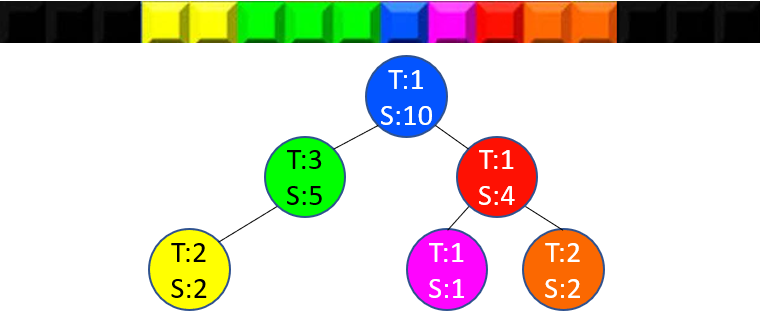
<p>A sum tree is a data structure which stores items with an associated term (a numerical value) for quick prefix and suffix sum operations. Think of a one-dimensional Tetris game with a stack of linear pieces of different colors, each of which is composed of one or more square blocks:</p>
<p><img src="/img/blog/sum-tree-tetris.png" alt="1D tetris illustration"></p>
<p>The data structure supports the following operations in <code class="code-span">O(log(n))</code> time:</p>
<ol>
<li>Getting the prefix and suffix sum of an item. This corresponds to counting the total number of blocks in all Tetris pieces left or right of a given piece.</li>
<li>Finding the item at a given prefix or suffix sum. This corresponds to finding the Tetris piece at the Nth block, counting from the left or right.</li>
<li>Inserting or removing items.</li>
</ol>
<h2>Inspiration</h2>
<p>I came up with this data structure to solve a problem in representing music notation, where items are individual notes and rests (generalized as &quot;events&quot;), and terms are duration values (quarter note, dotted eight note, etc.). I needed to be able to get the start time of an event (operation 1), find an event at a given time, and insert/remove events as quickly from the beginning of the score as near the end.</p>
<p>I could not find a reference to this data structure in the literature, though I suspect it exists under a different name.</p>
<h2>Construction</h2>
<p>A sum tree is implemented as a self-balancing binary tree where every node stores 1. an item with an associated numerical term value, and 2. the sum of the terms of all items in its subtree. Terms may be integers but can be generalized to arbitrary mathematical groups, from abstract algebra. My implementation uses an AVL tree for simplicity, but a red-black tree should work just as well. The properties require nodes to have a parent pointer and <code class="code-span">O(1)</code> lookup from item to tree node (using a pointer or by embedding the item in the node).</p>
<p><img src="/img/blog/sum-tree-tetris-nodes.png" alt="1D tetris deconstruction into a sum tree"></p>
<p>Assuming a well-constructed tree, we can easily show that the properties are honored in <code class="code-span">O(log(n))</code> time:</p>
<ol>
<li>To find the prefix sum of an item, add the sums of all left subtrees on the path to the root.</li>
<li>To find the item at a given prefix sum, walk down from the root, taking the left subtree if the position is smaller than its sum or subtracting the left subtree size and taking the right subtree otherwise.</li>
<li>To insert or remove an item, follow the logic of the underlying self-balancing binary tree and update all ancestors' sum based on the removed term. The tree rotation operations must be updated to maintain the subtree sum invariant, but this is fairly straightforward.</li>
</ol>
<p>An item's term can also be modified in <code class="code-span">O(log(n))</code>, by updating all ancestors' sum value.</p>
<h2>Variants</h2>
<h3>Indexable <code class="code-span">O(log(N))</code> list</h3>
<p>If all items have 1 as their term, the sum tree becomes an indexable list. Each item's prefix sum is its index in the list. The result is a compromise between a linked list and a resizable array (<code class="code-span">List&lt;T&gt;</code> in .NET):</p>
<ol>
<li>Lookup by index takes <code class="code-span">O(log(n))</code> for the sum tree, <code class="code-span">O(n)</code> for the linked list and <code class="code-span">O(1)</code> for the resizable array</li>
<li>Getting an item's index takes <code class="code-span">O(log(n))</code> for the sum tree, <code class="code-span">O(n)</code> for the linked list and <code class="code-span">O(n)</code> for the resizable array</li>
<li>Insertion and removal take <code class="code-span">O(log(n))</code> for the sum tree, <code class="code-span">O(1)</code> for the linked list and <code class="code-span">O(n)</code> for the resizable array</li>
</ol>
<h3>Multi-term items</h3>
<p>Since the term can be of any mathematical group, a tuple of two terms can serve as a composite term for an item. Going back to the Tetris example, if each piece has a term formed by the tuple (1, block count), then we can both index the tree and look it up by number of blocks from either side.</p>
<h3>Prefix sum tree</h3>
<p>I first implemented this variant where each node stores the sum of the terms in its left child's subtree rather than the sum of the subtree it defines itself. This provides the same properties as the regular sum tree for all prefix operations, but does not support suffix operations.</p>
<h3>Shiftable position tree</h3>
<p>A prefix sum tree is best visualized as a sequence of items with different lengths stacked from left to right. Interestingly, it also has a different application where items have a position but no intrinsic length (i.e. they are points on an axis). This is similar to a <code class="code-span">SortedDictionary&lt;Position, Item&gt;</code>, but has the additional benefit of supporting a shift operation in <code class="code-span">O(log(n))</code>, which inserts or removes space between two items, shifting all subsequent ones.</p>
<p>In this case, the item's term its distance from the previous item. When inserting a new item B at a position between two existing items A and C, B's term is set to its position minus A's position, and C's position is set to its position minus B's position. This preserves the original sums in the tree, so existing items are not shifted.</p>
<h2>In practice</h2>
<p>I found surprisingly many uses for the sum tree and its variants in the context of music notation, with integer, rational, fixed point and tuple terms. My implementation uses abstract and generic classes to achieve reuse for different data types:</p>
<pre><code class="language-cs"><span class="hljs-keyword">class</span> <span class="hljs-title">SelfBalancingTreeBase</span>&lt;<span class="hljs-title">TData</span>&gt;
<span class="hljs-keyword">class</span> <span class="hljs-title">SumTree</span>&lt;<span class="hljs-title">TSumTerm</span>, <span class="hljs-title">TData</span>&gt; : <span class="hljs-title">SelfBalancingTreeBase</span>&lt;...&gt;
    <span class="hljs-keyword">where</span> <span class="hljs-title">TSumTerm</span> : <span class="hljs-title">struct</span>, <span class="hljs-title">IAdditive</span>&lt;<span class="hljs-title">TSumTerm</span>&gt;
<span class="hljs-keyword">class</span> <span class="hljs-title">PrefixSumTree</span>&lt;<span class="hljs-title">TSumTerm</span>, <span class="hljs-title">TData</span>&gt; : <span class="hljs-title">SelfBalancingTreeBase</span>&lt;...&gt;
    <span class="hljs-keyword">where</span> <span class="hljs-title">TSumTerm</span> : <span class="hljs-title">struct</span>, <span class="hljs-title">IAdditive</span>&lt;<span class="hljs-title">TSumTerm</span>&gt;
<span class="hljs-keyword">class</span> <span class="hljs-title">ShiftablePositionTree</span>&lt;<span class="hljs-title">TOffset</span>, <span class="hljs-title">TValue</span>&gt; : <span class="hljs-title">SelfBalancingTreeBase</span>&lt;...&gt;
<span class="hljs-title">TreeList</span>&lt;<span class="hljs-title">T</span>&gt; : <span class="hljs-title">IList</span>&lt;<span class="hljs-title">T</span>&gt; <span class="hljs-comment">// built on a PrefixSumTree&lt;..., T&gt;</span>
</code></pre>
<p>C# 11 is planned to include static abstract members, allowing the use of operators on generic parameters, which would apply nicely to cases like this one.</p>
<p>Your comments on the content or form of this article are most welcome.</p>
]]></content>
    </entry>
    <entry>
        <title type="html"><![CDATA[How I Learn Languages]]></title>
        <id>https://tristanlabelle.com/blog/how-languages</id>
        <link href="https://tristanlabelle.com/blog/how-languages"/>
        <updated>2026-08-30T00:00:00.000Z</updated>
        <content type="html"><![CDATA[<h1>How I Learn Languages</h1>
<p>People often ask me how I learned 7 languages. Here I'll share the self-guided learning method that I developed over time, and that has worked great for my analytical mind. I find that everyone learn languages differently, so I recommend picking and choosing the tips that work for you.</p>
<p>I consider that classes are not necessary, but can be useful if you have specific objectives (pronunciation, exam preparation), or as a commitment device. If you do take classes, prefer 1-on-1 tutoring to maximize your speaking time time, and look for a teacher who can act as a language coach, helping you find your best way to learn.</p>
<p>I divide the process of learning a language into two phases: study and enjoyment. During the study phase, you're learning what you need to start interacting with the world that the language opens up. In the enjoyment phase, you're integrating using the language into your life and hobbies, such that you continue learning without it feeling like a study session. Each phase has different principles and activities that I describe below.</p>
<h2>Phase 1: Study</h2>
<p>When you start learning a language, it's unavoidable: you have to study the basics before you can start using it in the real world. This requires some discipline, and it helps if you're interested in the workings of the language and the process of learning it, as there are few extrinsic motivations like enjoying a movie in that language yet. During this phase, keep those two principles in mind:</p>
<ul>
<li><strong>Manage your stamina</strong>: Build a studying routine that you can sustain. I would often go to the park with my study materials for 30 mins every day. Find a learning buddy if you can. A teacher is not necessary but can help with accountability.</li>
<li><strong>Favor creating in the language</strong>: Make sure your studies involve speaking and writing as these are the skills that will get you to the next phase, and practicing them normally also involves listening and reading.</li>
</ul>
<h3>Listen to an audio course</h3>
<p>Audio courses are a great way to break the ice with a language. They start from zero and get you speaking basic sentences very fast, giving you early confidence in your ability. My go-to is the <a href="https://michelthomas.com">Michel Thomas series</a>, where a recorded teacher leads you through building basic, then progressively more complex sentences. For example, the recording might say &quot;if <em>the door</em> is <em>la puerta</em> and <em>open</em> is <em>abrir</em>, how would you say <em>open the door</em>?&quot;, followed by a pause to let you answer before giving and explaining the answer. The downside of audio courses is that they are dissociated from the written language and often explain little to no grammar.</p>
<h3>Learn the alphabet and its pronunciation</h3>
<p>Languages like Russian or Greek use non-Latin alphabets, so learning those is a prerequisite to any interaction with the written language, but even languages that use a familiar alphabet will have their own pronunciation rules, such as for the <code class="code-span">z</code> in German or the <code class="code-span">ll</code> in Spanish. Get familiar with how to pronounce every vowel, consonant, and combinations thereof. It's easy to find charts online and YouTube videos explaining it. If the pronunciation sounds very foreign, this is one time where booking a few classes with an online teacher (e.g. on <a href="https://www.italki.com">Italki</a>) pays off.</p>
<p>If you're learning Chinese or Japanese, at this stage you should focus on learning Pinyin and the tones, or Hiragana/Katakana. There are so many Chinese characters and Japanese kanji that learning them requires a more structured, long-term approach.</p>
<h3>Study basic grammar and vocabulary</h3>
<p>Grammar and vocabulary are the building blocks for expressing your ideas. I suggest building your initial vocabulary through learning basic grammar, especially understanding how to use verbs and construct sentences. I'm a fan of <a href="https://www.mheducation.com/highered">McGraw Hill</a>'s <strong>Schaum's Outlines of Grammar</strong> and <strong>Grammar Drills</strong> series: they explain one concept at a time and include hundreds of exercises to practice along the way. I often gave myself the challenge of building a single-page cheat sheet that summarized my understanding of the language's grammar — an impossible task, but the exercise helps me mentally organize what I've learned.</p>
<p>I recommend focusing your vocabulary study on the minimum you need for your early conversations (small talk about your hobbies, profession, etc.) by finding learners' podcasts, YouTube channels, or even beginner storybooks about related topics. You can get a lot of mileage out of simple words like good/bad, small/big, and you'll develop more advanced vocabulary naturally from exposure to the language.</p>
<h3>Read an easy e-book (stretch)</h3>
<p>You can quickly pick up a ton of vocabulary by reading an easy book, but it can be grueling to look up words in your dictionary every sentence, so at this stage I only recommend this if the language you're learning is close to one you're familiar with (e.g. both are romance languages). Use an e-reader and set up a translation dictionary such that touching a word gives you its translation, it's less tedious than constantly switching between a paper book and the dictionary app on your phone.</p>
<h3>⚠️ Choose your apps carefully</h3>
<p>I don't generally use language learning apps, outside of reference apps like a translator or dictionary. If you use an app, choose one that emphasizes writing or speaking in the language over reading or listening. I recommend avoiding gamified learning apps like Duolingo, which are more incentivized to make you feel good than to make you learn. Everyone has met someone with a 500-day streak who still couldn't say a word. If you must use Duolingo, try these hacks:</p>
<ol>
<li>Use the web app, not the mobile app. A keyboard-centric interface provides better practice than tapping already-written words.</li>
<li>Close your eyes before navigating to the next question, listen to the voice and try typing your answer without opening your eyes.</li>
<li>Instead of taking the Spanish course in English, take the English course in Spanish. Duolingo often asks you to translate into your spoken language, which is not as useful as translating into the language you're learning.</li>
</ol>
<h2>Phase 2: Enjoyment</h2>
<p>This phase begins once you are able to have simple conversations and read basic materials. In the <a href="https://en.wikipedia.org/wiki/Common_European_Framework_of_Reference_for_Languages">European Framework</a>, you're probably A2, approaching B1. At this point, new learning options open up that are more enjoyable and externally gratifying. The two principles of this phase are:</p>
<ul>
<li><strong>Get out there and speak the language</strong>: Speaking the language is how you develop your intuition for it; there is no substitute. People whose learning drags on for years don't dare speak it. But you are ready! Get out there and put it to use.</li>
<li><strong>Combine your learning with hobbies</strong>: Whatever you enjoy doing, you can probably do it in the language you're learning. This is how learning stops feeling like studying and just becomes fun.</li>
</ul>
<h3>Do language exchanges</h3>
<p>Exchanging languages just means speaking the language you're learning with people who understand that you're practicing, and may be practicing other languages of their own. It's not necessarily an equal time my-language-for-yours situation, but you should be willing to help others with your native language.</p>
<p>Every medium to large city has one or more language exchange meetups, which you can usually find on <a href="https://meetup.com">meetup.com</a>. There are multilingual meetups as well as meetups that focus on a specific language. These events are often free or the cost of a drink. I find that the best meetups impose little structure beyond helping people find others that speak the same language. When there is an active host role, it tends to make all conversations between them and one participant at a time, while everyone else listens.</p>
<p>I recommend attending in-person meetups, but I learned much of my Spanish with online language exchanges. These are interesting because you can make friends with people whose background is very different from yours, and maybe one day visit them. Last I knew <a href="https://tandem.net">Tandem</a> was a popular option, but whichever platform you choose, make sure to have conversations over video calls, not just text messages.</p>
<h3>Listen to real podcasts</h3>
<p>Podcasts that help you learn a language are useful but still feel like studying. At this point you can start transitioning to podcasts that cover topics you enjoy, while still helping you build your vocabulary. Many languages have podcasts of the sort &quot;News in Slow German&quot;, which provide a good middle ground if podcasts for native speakers are still too difficult. I'll often slow podcasts down to 80% or 70% speed if I have trouble following.</p>
<h3>Read a book</h3>
<p>Reading a book may still be a lot of work, but you can make it more fun by choosing a genre you enjoy, or continuing a series you've started by picking up the next book in the language you're learning. You'll need to use a translation dictionary a lot, and switching to your phone every minute is tiresome, so I recommend getting an e-reader with an integrated translation dictionary (you might have to buy it), such that simply touching a word gives you its translation.</p>
<h3>Watch movies and listen to music</h3>
<p>I'm neither a cinephile nor do I pay attention to lyrics in music, but I'm weird. Most people will find watching movies in the language they're learning to be a great way to get their ears used to natural uses of the language. Use subtitles if you need them, but first try putting both the audio and subtitles in the language you're learning. If you keep the audio or subtitles in a language you know, make sure it's only for support and you're paying attention to the foreign language content first.</p>
<h3>Travel!</h3>
<p>Traveling is the ultimate way to put your language learning into practice, but make sure to structure your trip to maximize your opportunities of speaking with locals. Here's what I recommend:</p>
<ul>
<li><strong>Choose your travel buddies</strong>: Travel solo, with other language learners, or to meet a local friend. If you travel with friends that don't speak the language, you risk creating a language bubble around you and limiting your opportunities to practice.</li>
<li><strong>Choose your accommodation</strong>: Hotels are less likely to provide many speaking opportunities, so better go with bed and breakfasts, AirBnB rooms in a local's home, or hostels. For maximum mingling with locals, consider looking for a couch surfing host. I recommend the <a href="https://couchers.org">Couchers.org</a> platform, but I'm biased as one of its developers. :)</li>
<li><strong>Plan time for social activities</strong>: local sports, dancing or language exchanges events you can find on <a href="https://meetup.com">Meetup.com</a>. If you're brave, visit a <a href="https://toastmasters.org">Toastmasters</a> club and try delivering an improvised speech.</li>
</ul>
]]></content>
    </entry>
</feed>